
Safer recruitment, from first click to first shift.
Candidates apply on their phone, gaps and references are checked as they go, and nobody can be marked ready to start until every check has its evidence. Workforce is an optional add-on to Eviqa Assure.
An application candidates finish on their phone.
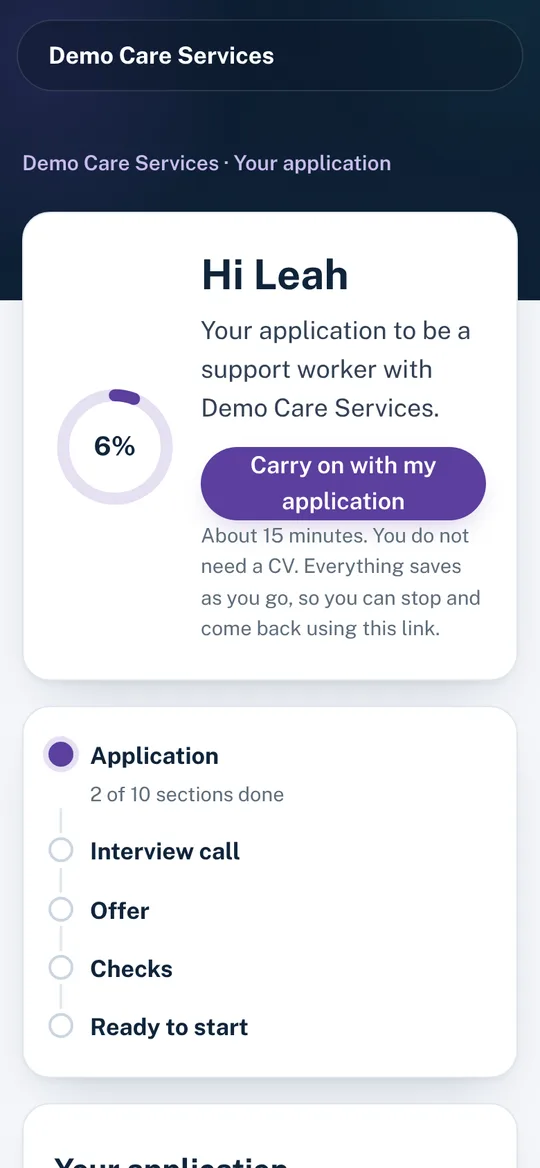
Most care applicants apply on a phone, often in a break between shifts. Workforce gives each one their own link to a short, clear application that saves as they go, so nobody loses their answers.
- No CV needed. Ten short sections, with a progress ring that shows what is done and what is next.
- Your brand, not ours. Candidates see your logo or name throughout.
- One journey to the first shift. Interview times, the offer and every check after it sit behind the same link.
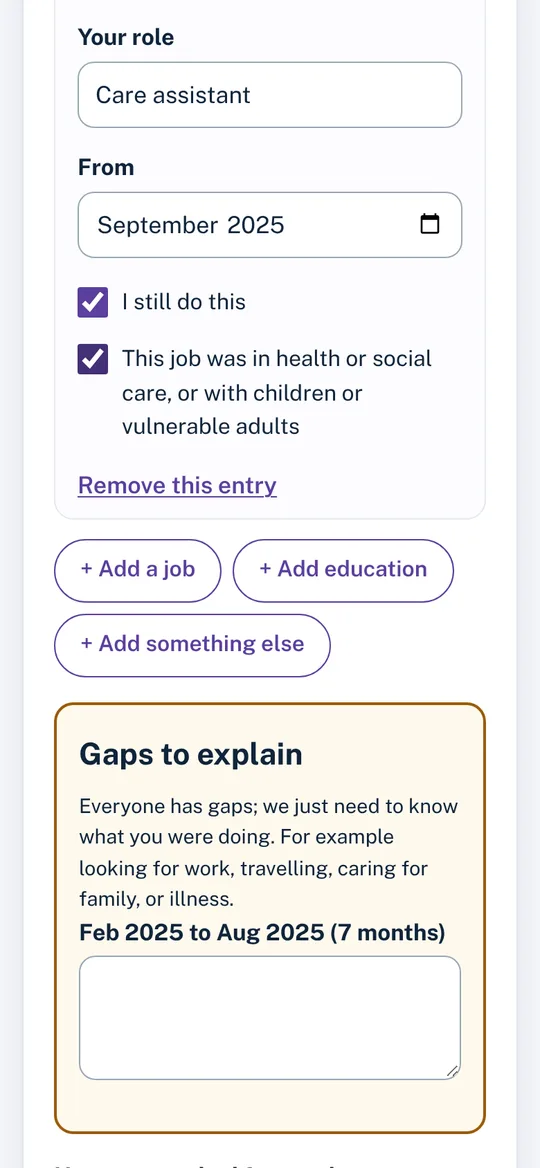
Gaps found while they type, not after.
Schedule 3 asks for a full employment history and a written explanation of any gaps. As the candidate adds jobs, education and time out, a live timeline shows where the gaps are and asks them to explain each one longer than a month.
You see the history, the gaps and the explanations together, so nothing is missed at interview.
Every candidate, and what happens next.
Candidates move from applied to screened, interview, offer, checks and ready to start. Each card shows where they came from and how far through the checks they are.
- Add candidates from anywhere: Indeed, DWP Find a Job, Facebook, referrals or your own website, each sent their own link.
- Messages written for you, from invite to offer, emailed from Assure or copied to paste elsewhere.
- A "next step" prompt on every candidate, so nobody stalls.

Interviews and references, done the same way every time
Structured, so every candidate is judged on the same things, and you can show how you decided.
Interview scoring
Eight questions, each with what a good answer looks like. An offer cannot be made until the candidate has passed.
Values that matter most
A low score on safeguarding, boundaries or speaking up means the candidate does not pass, whatever their total.
Candidates choose a time
Offer interview times and the candidate picks one, then adds it to their calendar.
References in five minutes
Referees get their own link to a short, structured form: dates, reason for leaving, conduct, safeguarding and whether they would re-employ.
Concerns flagged
Anything worrying in a reference is flagged to you straight away.
The right referees
The most recent employer, and a care referee when the candidate has worked in care before.
Nobody starts until every check has its evidence.
Every candidate has the same 12-item checklist. Each item needs its evidence, who checked it and when, and the candidate cannot be marked ready to start until all 12 are done.
- After the offer, candidates upload photo ID, right to work and driving documents from their phone, and complete the health questionnaire.
- Criminal record and health answers are stored separately and encrypted. Only the people you nominate can open them, and every opening is logged.
- Documents to read and accept, such as your scope and boundaries policy, are signed off in the same place.

Regulation 19 and Schedule 3, in one record
The information CQC expects you to hold for every person you employ, and where Workforce keeps it.
| What is asked | What Workforce records |
|---|---|
| Proof of identity, including a recent photograph | Photo ID uploaded by the candidate, checked and signed off by you. |
| A criminal record certificate (DBS) | The DBS check on the checklist, with the candidate's declaration kept in the restricted store. |
| Evidence of conduct in previous care work, and why it ended | Structured references from the most recent and care employers, with concerns flagged. |
| A full employment history, with gaps explained in writing | The live timeline, each gap and the candidate's explanation. |
| Relevant qualifications | Qualifications from the application, checked on the checklist. |
| Information about health relevant to the role | The health questionnaire, kept in the restricted store for nominated people only. |
| Right to work in the UK | Share code or passport, with a follow-up date if permission is time-limited. |
Private by design.
Files and sensitive answers are encrypted. Unsuccessful and withdrawn candidates are deleted automatically six months after the outcome. Equality monitoring is optional and anonymous, and figures only appear once there are enough answers to keep people anonymous.
Workforce sits inside Assure, with the same security, organisation separation and audit trail. Security and data
Coming in 2027
- Staff records with expiry dates and reminders.
- Training matrix, supervision and appraisal.
- Digital identity and right to work checks.
- DBS checks through an umbrella body.
- Careers pages and job feeds for your own website.
Common questions
Is Workforce included in Assure plans?
No. Workforce is an optional add-on to any Assure plan, priced by the number of staff. Ask us for a price.
Do candidates need an account?
No. Each candidate gets their own secure link. They can stop and come back to it at any time, on any device.
Who can see criminal record and health answers?
Only the people you nominate. The answers are stored separately and encrypted, and every time someone opens them it is logged.
What happens to unsuccessful candidates' details?
They are deleted automatically six months after the outcome.
Will candidates see Eviqa's branding?
No. Candidates see your organisation's logo or name, with a small "Powered by Eviqa Assure" in the footer.
Does it replace our HR system?
Not today. Workforce covers recruitment and the checks before someone starts. Staff records with expiry dates, training, supervision and digital identity and DBS checks are planned for 2027.
Explore more of Assure
The safer recruitment checks CQC expects
What Regulation 19 and Schedule 3 ask for, check by check.
Read moreDelegated tasks and competency
Once they start: sign-off per person and per task, with expiry reminders.
Read morePolicies and read-and-sign
Version-controlled policies, read-and-sign tracking and review reminders.
Read moreRecruit safely, and show it.
Book a demo and we will walk you through an application, the board and the pre-start checks.
Workforce is an optional add-on to any Assure plan, priced by the number of staff.